



In the field of software development nowadays, we are creating sizable corporate apps and resolving challenging business issues. Therefore, a key component of any.NET application’s performance and scalability is its design.
Efficient Resource Management
Resources are very critical for the existence and survival of any application. Examples of resources include objects, files, connections, handles, streams, and so on. Hence proper handling and cleanup of such resources are critical for better system performance.
Here are points to consider.
- Should properly handle the object creation and cleanup if needed.
- In .NET some objects offer a Close() method to do proper handling of resources. Some of those are db connections, streams, and so on.
- .NET provides properly structured blocks that can be used in your code to enforce the cleanup if the situation arises. For example, finally blocks or using statements can be used to ensure that resources are closed or released properly and in a timely fashion.
Considerations for Crossings the Application boundary
Applications live and run in their territory defined by the Machine, Process, or Application Domains they are hosted in or deployed on. In other words, if two applications communicate with each other across machines then a process r app domain there is a significant impact on the performance of the application.
Cross application domain: In .NET a process is optimized to have multiple application domains that can then host an application inside those app domains. This is the most efficient boundary to cross because it is within the context of a single process.
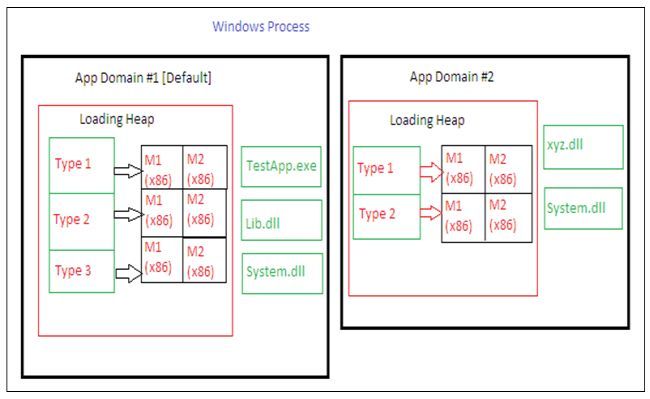
Cross process: Crossing a process boundary significantly impacts performance. You should do so only when absolutely necessary. For example, you might determine that an Enterprise Services server application is required for security and fault tolerance purposes.
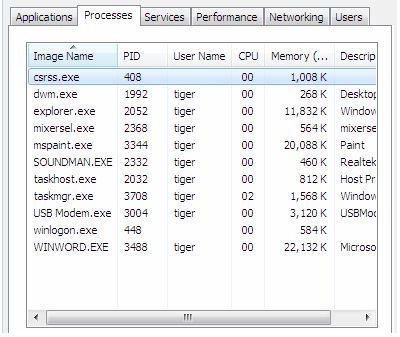
Cross machine: Crossing a machine boundary is the most expensive boundary to cross, due to network latency and marshaling overhead. Before introducing a remote server into your design, you need to consider the relative tradeoffs, including performance, security, and administration.
Single Large Assemblies or Multiple Smaller Assemblies
In .NET an assembly is the unit of deployment; an application exists in the form of an assembly only. Any application you have built after compilation produces an assembly only. All the DLLs your project refers to are .NET Assemblies only.
When working on designing and architecting a solution it is critical to consider that various functionalities, classes and interfaces, and so on should be part of one single chunky assembly or should be divided across multiple smaller assemblies.
The following are points to consider
- To help reduce your application’s working set (in simple terms a set of memory pages required to host the application in the process), you should prefer single larger assemblies rather than multiple smaller assemblies. If you have several assemblies that are always loaded together, you should combine them and create a single assembly.
- Reasons to avoid multiple smaller assemblies:
- Since you have multiple assemblies consider the cost required in loading metadata for multiple smaller assemblies.
- JIT compile time will be much more depending on the count of assemblies.
- Security checks are needed for multiple assemblies.
- At times, the project architecture demands splitting assemblies into multiple ones; for example, for versioning and deployment reasons. If you need to ship types separately, you may need separate assemblies. If you have a valid scenario(s) feel free to do so.
Code Refactoring by Logical Layers
Code refactoring suggestions are the most common comments developers receive during their code review. Hence, we usually follow the best practices of Separation of Concerns, and so on.
Here are points to consider.
- The class’s internal design needs to be considered to decide how you factor code into separate methods.
- Better code refactoring boosts up the ease of tuning to improve performance; simplify maintainability and adding new functionality.
- Like many things code refactoring needs a proper end where you stop further refactoring. In other words, clearly re-factored code improves maintainability but a developer needs to be cautious of over-abstraction and dividing functionality into many layers.
- Try to keep your application’s design simple, effective, and efficient, as much as you can.
Threads are Resources Worth Sharing
Many applications use threads internally and behind the scenes, which works well and doesn’t cause much noise. The problem starts when we take control of ourselves and don’t follow the right practices.
Here are points to consider.
- Threads use both managed and unmanaged resources and are expensive to initialize. The following code shows a new thread is created and maintained for each request.
- This may result in the processor spending most of its time performing thread switches; it also places increased pressure on the garbage collector to clean up resources.
- Use the CLR thread pool to execute thread-based work to avoid expensive thread initialization. The following code shows a method being executed using a thread from the thread pool.
- When QueueUserWorkItem is called, the method is queued for execution, and the calling thread returns and continues execution. The ThreadPool class uses a thread from the application’s pool to execute the method passed in the callback as soon as a thread is available.
Best and Most Recommended ASP.NET Core 10.0 Hosting
Fortunately, there are a number of dependable and recommended web hosts available that can help you gain control of your website’s performance and improve your ASP.NET Core 10.0 web ranking. HostForLIFE.eu is highly recommended. In Europe, HostForLIFE.eu is the most popular option for first-time web hosts searching for an affordable plan. Their standard price begins at only €3.49 per month. Customers are permitted to choose quarterly and annual plans based on their preferences. HostForLIFE.eu guarantees “No Hidden Fees” and an industry-leading ’30 Days Cash Back’ policy. Customers who terminate their service within the first thirty days are eligible for a full refund.
By providing reseller hosting accounts, HostForLIFE.eu also gives its consumers the chance to generate income. You can purchase their reseller hosting account, host an unlimited number of websites on it, and even sell some of your hosting space to others. This is one of the most effective methods for making money online. They will take care of all your customers’ hosting needs, so you do not need to fret about hosting-related matters.